
Understanding JavaScript Closures in Loops with Easy Examples
Learn how JavaScript closures behave inside loops with simple examples. Understand common mistakes and how to fix them effectively.
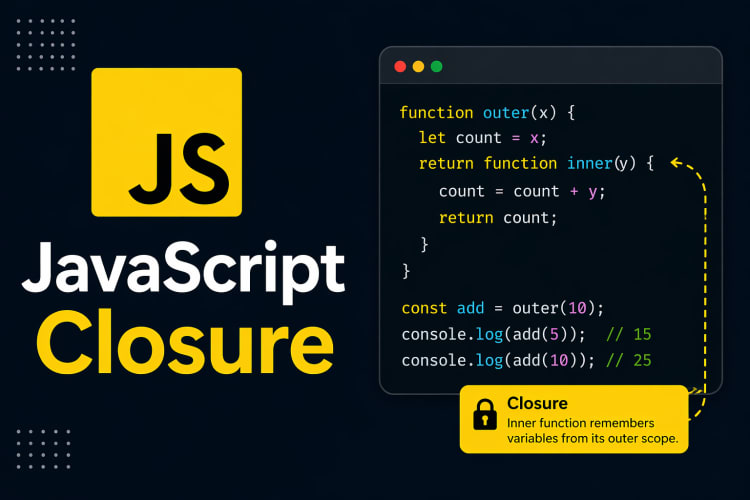
JavaScript Closure
A JavaScript closure is a function that retains access to its lexical scope, allowing it to reference variables from its containing (outer) function even when it is executed outside that scope.
In other words, when you create a function inside another function, the inner function forms a closure. This means it can access variables from its scope, the outer function scope, and even the global scope.
Syntax
Following is the syntax of JavaScript closure to use inside the loops:
function outerFunction() {
   // Variable in the outer function's scope
   let outerVariable = 'Outer';
   // Inner function (closure)
   function innerFunction() {
       // Accessing the outer variable
       console.log(outerVariable);
   }
   // Return the inner function
   return innerFunction;
}
// Creating a closure
const myClosure = outerFunction();
// Calling the closure
myClosure();
Inside the for loop
A for loop in JavaScript is a control structure that allows you to repeat a block of code a specific number of times. It includes three main components as follows:
- Initialization
- Condition
- Updation (increment/decrement)
Syntax
Following is the syntax of the for-loop:
for (initialization; condition; updation) {
    // Code
}
Example
In the following example, we will use the closure within the for loop, which will perform certain operations repeatedly till the for loop is not ended as follows:
<!DOCTYPE html>
<html lang="en">
<head>
   <meta charset="UTF-8">
   <meta name="viewport" content="width=device-width, initial-scale=1.0">
   <title>Closure Example</title>
</head>
<body>
   <p>Example of using closure inside for loop</p>
   <script>
       function createFunctions() {
           const functions = [];
           for (let i = 0; i < 5; i++) {
               // Creating a closure
               functions.push(function() {
                   document.write(i + " ");
               });
           }
           return functions;
       }
   const myFunctions = createFunctions();
   myFunctions.forEach(func => func());//call each function
   </script>
</body>
</html>
Output
Following is the output of the above example -
0 1 2 3 4Inside the while loop
A while loop in JavaScript is a control structure that repeatedly executes a code block if a specified condition is true. It's useful when the number of iterations is not known earlier.
Syntax
Following is the syntax of the while-loop:
while (condition) {
    // Code
}
Example
The following is another example of using closure inside loops, we will use the closure inside the while loop as follows:
<!DOCTYPE html>
<html lang="en">
<head>
   <meta charset="UTF-8">
   <meta name="viewport" content="width=device-width, initial-scale=1.0">
   <title>Closure Example</title>
</head>
<body>
   <p>Example of using closure inside while loop</p>
   <script>
   function createCounter() {
       let count = 0;
       return function() {
       count += 1;
       document.write(count + " ");
   };
}
// Create the counter function
const counter = createCounter();
// Using a while loop to call the counter function multiple times
let i = 0;
while (i <=10) {
   counter();
   i++;
}
   </script>
</body>
</html>
Output
After executing the above program, the following output will be displayed:
1 2 3 4 5 6 7 8 9 10 11Practical Use Cases of Closures
Closures are not just a theoretical concept — they are used everywhere in real JavaScript code. Here are common real-world applications:
1. Counter Function
function makeCounter() {
  let count = 0;
  return function() {
    count++;
    return count;
  };
}
const counter = makeCounter();
console.log(counter()); // 1
console.log(counter()); // 2
console.log(counter()); // 3
The inner function retains access to count even after makeCounter has finished executing. This is a classic closure.
2. Data Privacy / Encapsulation
function bankAccount(initialBalance) {
  let balance = initialBalance; // private variable
  return {
    deposit: (amount) => { balance += amount; },
    withdraw: (amount) => { balance -= amount; },
    getBalance: () => balance
  };
}
const account = bankAccount(1000);
account.deposit(500);
console.log(account.getBalance()); // 1500
Here, balance is completely private — it cannot be accessed or modified directly from outside the function.
Common Interview Questions on Closures
- What is a closure in JavaScript?
- How do closures help with data privacy?
- Explain the classic
varloop problem and how to fix it usingletor IIFE - What is the difference between a closure and a callback?
Understanding closures deeply will make you a stronger JavaScript developer and help you write cleaner, more maintainable code.
Frequently Asked Questions
What is Understanding JavaScript Closures in Loops?
Learn how JavaScript closures behave inside loops with simple examples. Understand common mistakes and how to fix them effectively.
How does Understanding JavaScript Closures in Loops work?
JavaScript Closure A JavaScript closure is a function that retains access to its lexical scope, allowing it to reference variables from its containing (outer) function even when it is executed outside that scope. In other words, when you create a function inside another function, the inner function forms a closure. This means it can access variables from its scope, the outer function scope, and even the global scope.
Who should learn Understanding JavaScript Closures in Loops?
Understanding JavaScript Closures in Loops is ideal for developers, students, and technology professionals who want to build modern applications or improve their coding skills. Even beginners can benefit from understanding the basics covered in this article.
What are the main benefits of using Understanding JavaScript Closures in Loops?
Learn how JavaScript closures behave inside loops with simple examples. Understand common mistakes and how to fix them effectively. The benefits include improved performance, easier development, and better maintainability compared to older approaches.
Is Understanding JavaScript Closures in Loops free to use?
Most open-source technologies like Understanding JavaScript Closures in Loops are completely free to use for personal and commercial projects. Licensing details are usually available on the official documentation website. This article explains where to get started at no cost.
Version History 3 updates
- Jun 16, 2026
Updated: content
- Jun 16, 2026
Updated: faqs
- Apr 24, 2026
Updated: title, description, content, categories, tags, featuredImage, status