
HTML Headings, Paragraphs and Text Formatting: Complete Beginner Guide (Chapter 2)
Learn HTML headings, paragraphs, line breaks, horizontal lines, and text formatting tags with simple examples. Perfect for beginners starting web development with HTML Chapter 2.

Chapter 2: HTML Headings, Paragraphs, and Text Formatting
Welcome to Chapter 2 of our HTML learning journey.
In Chapter 1, we learned what HTML is, why it is important, how browsers read HTML, and how to create our first HTML file.
Now it is time to write actual content on a web page.
Think about any website you visit daily. Every website contains headings, paragraphs, important text, links, and different types of content. HTML provides special tags for all these things.
Let's learn them one by one.
What Are HTML Headings?
Headings are used to define titles and subtitles on a web page.
For example:
- Main page title
- Section title
- Subsection title
HTML provides six heading levels.
<h1>This is Heading 1</h1>
<h2>This is Heading 2</h2>
<h3>This is Heading 3</h3>
<h4>This is Heading 4</h4>
<h5>This is Heading 5</h5>
<h6>This is Heading 6</h6>
The <h1> tag is the most important heading and usually appears only once on a page.
The <h6> tag is the smallest heading.
Example
<h1>HTML Tutorial</h1>
<h2>Introduction</h2>
<h3>What is HTML?</h3>
Why Are Headings Important?
Headings help:
- Organize content
- Improve readability
- Help search engines understand your page
- Improve accessibility
Always use headings in proper order.
Good:
<h1>Main Title</h1>
<h2>Section</h2>
<h3>Subsection</h3>
Avoid skipping levels unnecessarily.
What Are Paragraphs?
Paragraphs are used to display normal text content.
The paragraph tag is:
<p>This is a paragraph.</p>Example:
<p>
HTML is the foundation of every website.
It helps create the structure of web pages.
</p>
The browser automatically adds some space before and after paragraphs.
Multiple Paragraphs Example
<p>Welcome to HTML learning.</p>
<p>This is our second paragraph.</p>
<p>Keep practicing every day.</p>
Each paragraph appears on a separate line.
Why Doesn't HTML Respect Extra Spaces?
Beginners often notice something strange.
Example:
<p>Hello World</p>Even though multiple spaces are written, the browser displays:
Hello World
This happens because HTML ignores extra spaces and line breaks by default. The browser treats multiple spaces as a single space.
Line Breaks in HTML
Sometimes you want text to start on a new line without creating a new paragraph.
For that, HTML provides the <br> tag.
Example:
<p>
My Name is Vivek.<br>
I am learning HTML.<br>
I want to become a web developer.
</p>
Output:
My Name is Vivek.
I am learning HTML.
I want to become a web developer.
Notice that <br> does not need a closing tag.
Horizontal Line Tag
The <hr> tag creates a horizontal line.
Example:
<p>Chapter 1</p>
<hr>
<p>Chapter 2</p>
Output:
A horizontal line appears between the two sections. This is commonly used to separate content.
Text Formatting in HTML
HTML provides several tags to make text look different.
Bold Text
<b>Bold Text</b>Output:
Bold TextStrong Text
<strong>Important Text</strong>Output:
Important TextBoth appear bold, but <strong> also tells the browser that the content is important.
Italic Text
<i>Italic Text</i>Output:
Italic TextEmphasized Text
<em>Emphasized Text</em>Output:
Emphasized TextLike <strong>, the <em> tag also carries meaning and importance.
Underlined Text
<u>Underlined Text</u>Output:
Underlined TextSmall Text
<small>Small Text</small>Output:
Small Text appears smaller than normal text.Marked Text
<mark>Highlighted Text</mark>Output:
The text appears highlighted.Deleted Text
<del>Old Price ₹999</del>Output:
Old Price appears crossed out.Inserted Text
<ins>New Price ₹499</ins>Output:
The text appears underlined.Practice Example
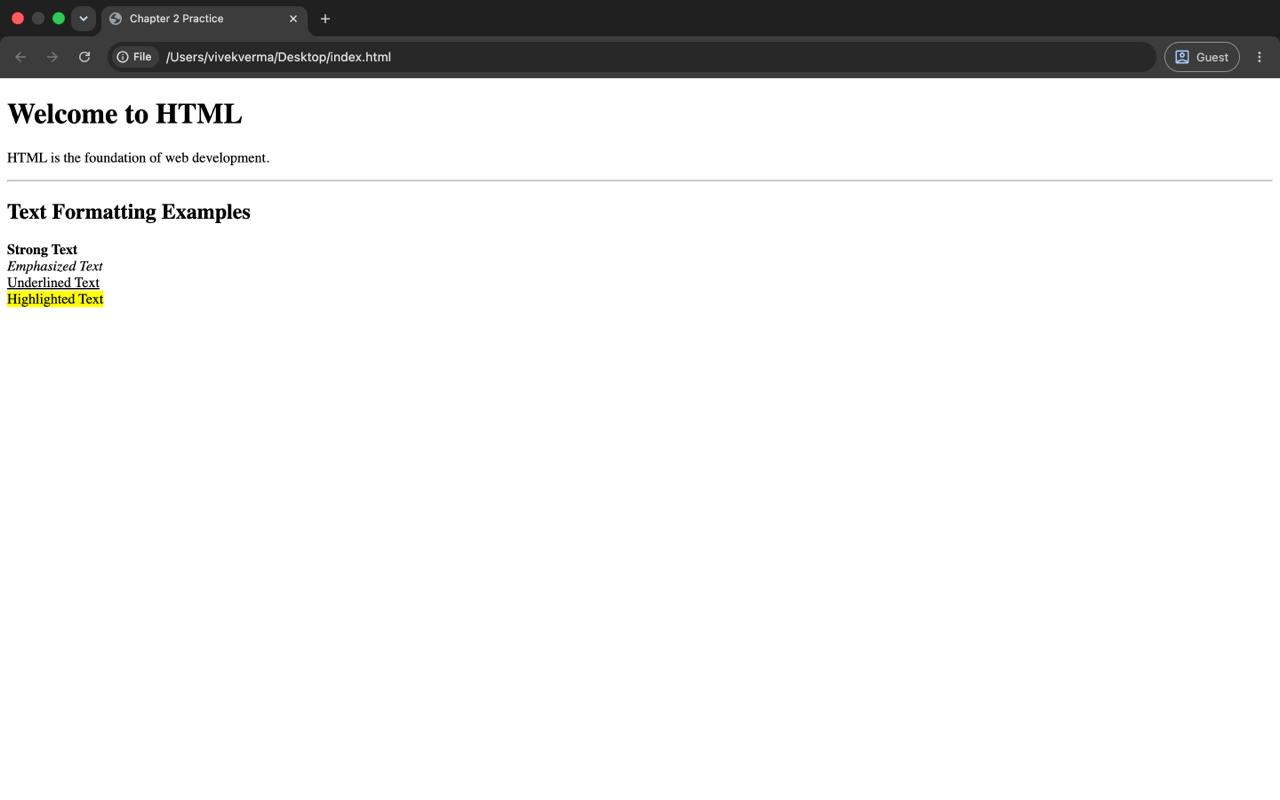
Create a file called practice.html and write:
<!DOCTYPE html>
<html>
<head>
    <title>Chapter 2 Practice</title>
</head>
<body>
    <h1>Welcome to HTML</h1>
    <p>
        HTML is the foundation of web development.
    </p>
    <hr>
    <h2>Text Formatting Examples</h2>
    <p>
        <strong>Strong Text</strong><br>
        <em>Emphasized Text</em><br>
        <u>Underlined Text</u><br>
        <mark>Highlighted Text</mark>
    </p>
</body>
</html>
Save the file and open it in your browser. Try changing the text and see what happens. Learning HTML becomes easier when you experiment.'
Output:
Common Mistakes Beginners Make
1. Forgetting Closing Tags
Wrong:
<p>Hello WorldCorrect:
<p>Hello World</p>2. Using Multiple <h1> Tags Everywhere
Beginners often make everything an <h1>. Use heading levels properly.
3. Using <br> Too Much
Use paragraphs for large blocks of text. Use <br> only when you need a simple line break.
4. Forgetting to Save the File
Always save your file before refreshing the browser.
Frequently Asked Questions
Which Heading Tag Should I Use Most?
Use only one <h1> for the main title and <h2>, <h3>, and others for sections and subsections.
What is the Difference Between <b> and <strong>?
Both appear bold; however, <strong> tells browsers and search engines that the text is important.
What is the Difference Between <i> and <em>?
Both usually appear italic. The <em> tag gives meaning and emphasis to the content.
Can I Use Multiple Paragraph Tags?
Yes, in fact, separate ideas should be written in separate paragraphs.
Version History 4 updates
- Jun 27, 2026
Updated: seriesName, seriesOrder
- Jun 27, 2026
Updated: title, description, content, categories, tags, featuredImage, images, status, faqs, seriesName, seriesOrder, slug, rejectionReason
- Jun 25, 2026
Updated: title, description, content, categories, tags, featuredImage, images, status, faqs, slug, rejectionReason
- Jun 25, 2026
Updated: title, description, content, categories, tags, featuredImage, images, status, faqs, slug, rejectionReason